
Meta Quest Virtual Display adds camera and USB PC features
Meta Quest Virtual Display and Mixed Reality Link add camera, microphone, USB streaming and two-way computer input for Quest 3 and 3S on Windows.
By vrBlogs
· 4 min read · Source: UploadVR
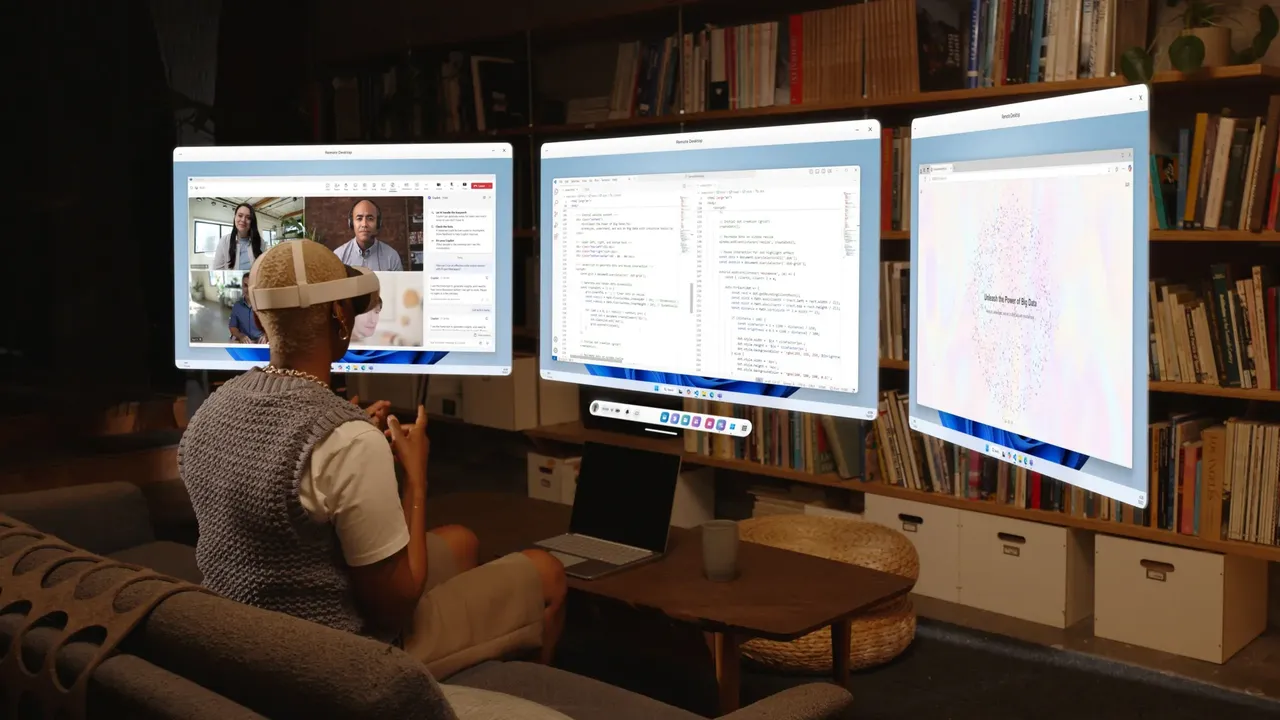
Meta Quest Virtual Display is gaining camera, microphone, USB streaming and computer input features through updates from Meta and Microsoft. The changes apply to Meta Quest 3 and Meta Quest 3S, with several functions available through the Mixed Reality Link PC app on Windows 11.
Microsoft documented camera and microphone streaming on September 18, 2026, and USB streaming on November 5, 2026. A November 24, 2026 report also describes a two-way input feature called Computer Inputs.
Headset cameras and microphone reach Windows
Mixed Reality Link can expose the headset's built-in microphone to Windows applications. Users can select it as an audio input for Teams meetings, games, chats or conversations with an AI assistant, without connecting a separate microphone to the PC. Microsoft calls this source Mixed Reality Link Microphone, as described in its camera and microphone announcement.
The headset's forward-facing passthrough cameras can also become Windows video sources. This lets users share their viewpoint in compatible applications. The source is listed as Mixed Reality Link Passthrough.
Mixed Reality Link Avatar Camera provides another source for Meta Quest users. It lets them appear as their Meta Avatar in Windows instead of using a webcam, including in applications such as Discord and Zoom. Meta's Horizon OS 2.10 added avatar video calls in the Chats app, while Meta first introduced its Selfie Camera functionality in v76 PTC more than a year earlier.
Microsoft says these camera and microphone features require Mixed Reality Link version 26.9105.9070.0 or later. After connecting the headset to the PC through Mixed Reality Link, users select Mixed Reality Link Microphone, Mixed Reality Link Passthrough or Mixed Reality Link Avatar Camera inside their Windows application.
Meta's Chats implementation and Microsoft's Mixed Reality Link implementation could provide groundwork for Hologram Calling, an upcoming feature for Meta VR Glasses.
Wired Quest streaming over USB
Mixed Reality Link now streams a Windows desktop to Meta Quest 3 or Meta Quest 3S over USB. Microsoft presents this as an alternative when Wi-Fi coverage is poor, a network is congested, public Wi-Fi prevents the PC and headset from communicating, or a user is traveling without internet access, according to its USB streaming announcement.
First-time USB pairing does not require scanning a QR code or entering a PIN. The connection uses the same USB NCM permission added to Quest in Horizon OS 2.5, which Valve's Steam Link and Virtual Desktop later supported, with Virtual Desktop support in its beta channel.
USB streaming requires a Windows 11 PC, Mixed Reality Link version 26.10120.9280.1 or newer, a Meta Quest 3 or 3S headset and a USB data cable. Meta is rolling out USB support over the following week, so installing the latest PC software does not guarantee that the headset already has access.
Setup requires installing or updating Mixed Reality Link on the PC, opening Settings → Link on Quest and enabling “USB connection for apps,” connecting the headset with a USB data cable, then opening Virtual Display and following its pairing prompts. Users can connect to a previously paired PC through the same process.
Computer Inputs expands control beyond Windows
Meta Quest Virtual Display and Mixed Reality Link appear to be rolling out two-way mouse and keyboard forwarding through a setting called Computer Inputs. The feature is described in a November 24, 2026 report, but remains currently undocumented by Microsoft.
Previously, Virtual Display and Mixed Reality Link kept the host PC's mouse and keyboard within the Windows desktop. Controlling Horizon OS required hand tracking, Touch controllers or another mouse and keyboard connected directly to the headset.
With Computer Inputs enabled, the host PC's mouse and keyboard can move beyond the desktop window and control the headset as though those peripherals were connected directly to it. This supports mixed use of PC applications and headset applications without switching input methods. Users can disable the setting to keep input limited to the Windows desktop.
Reported testing found that the feature worked as expected, but Touch controllers could sometimes make the mouse cursor disappear from the headset interface while the headset was connected to the host PC. Disabling Computer Inputs does not affect a mouse and keyboard connected directly to the headset.
Virtual Display's wider role
Virtual Display, formerly called Remote Desktop, is Meta's first-party display-mirroring app. It works with Windows and Mac devices. In Horizon OS 2.7, Meta also merged Meta Quest HDMI Link functionality into Virtual Display, creating one app for several screen-mirroring uses.
Earlier cooperation between Meta and Microsoft added simplified connections, hand and controller input forwarding and virtual ultrawide support for Quest 3 and 3S with Mixed Reality Link on Windows 11. Some of those functions later became available on devices that do not use Mixed Reality Link.
The updates arrive as Meta VR Glasses approach their spring 2027 launch, with productivity among their marketed use cases. Their puck supports DisplayPort input, allowing the glasses to work as a display for a Mac, Windows PC or console.
Enjoyed this story?
Like it to tell the editors, or save it to read later.
Comments
Sign in to join the conversation.
Sign inNo comments yet. Start the conversation.
·