How to play Xbox Cloud Gaming on Meta Quest
Stream Xbox Game Pass games on Meta Quest: plan options and monthly cloud hours, installing the Xbox app, pairing a controller and setting up the screen.
- Débutant
- 15 min
- Vérifié le Meta Quest build 60.0 or later; Gamepad mode needs Meta Horizon OS 2.7
- Dernière vérification : 31 octobre 2026
Ce dont vous avez besoin
- Meta Quest 2, Quest Pro, Quest 3 or Quest 3S on build 60.0 or later
- Xbox Game Pass Essential, Premium or Ultimate (or a free Microsoft account for supported free-to-play games)
- A compatible gamepad, or Touch controllers in Gamepad mode on Quest 3/3S
- 5GHz Wi-Fi with at least 20Mbps download
This guide shows you how to stream Xbox games to a Meta Quest headset with the Xbox app: what you need, which Game Pass plan covers it, how to pair a controller and sign in, and how to set up the screen. The steps follow Meta's article Learn about Xbox Cloud Gaming on Meta Quest, Xbox's Xbox on VR headsets page and Xbox Wire's note on upcoming cloud gaming changes.
1. Check what you need
- A headset: Meta Quest 2, Quest Pro, Quest 3 or Quest 3S.
- A subscription: an Xbox Game Pass subscription for most games. Supported free-to-play games, such as Fortnite, only need a free Microsoft account.
- A controller: a compatible gamepad (see section 4). Quest 3 and 3S can also use the Touch controllers in Gamepad mode.
- Fast internet: Xbox says the best performance comes from a 5GHz Wi-Fi connection at 20Mbps or faster.
Meta says Xbox Cloud Gaming is available everywhere Meta Quest is supported, except Iceland and Taiwan. Xbox lists exact markets on its regions page.
2. Choose a Game Pass plan
Xbox Support says a Game Pass Essential, Premium or Ultimate subscription can be used for cloud gaming. You don't need Ultimate specifically. Beginning in November 2026, Xbox says each plan includes a set number of cloud gaming hours per month:
- Game Pass Ultimate: 15 hours
- Game Pass Premium: 10 hours
- Game Pass Essential: 5 hours
Once you use those hours, Xbox says you can buy more cloud playtime in the Xbox Store. From November you can also buy playtime without Game Pass to stream eligible games you own. Xbox says it will share prices before the change takes effect.
Two other ways in:
- Meta Horizon+: since July 21, 2026, eligible subscribers in supported regions get a starter edition of Xbox Game Pass with 50+ games and 10 hours of cloud gaming each month.
- Meta Quest 3S Xbox Edition: it comes with a 3 month Game Pass Ultimate subscription. If you already subscribe, Meta says the promotional months are added to your existing subscription.
3. Install the Xbox app
- Using your headset or the Meta Horizon mobile app, download the free Xbox app from the Meta Horizon Store.
- If you can't find it, update your headset. Meta says you need at least Meta Quest build 60.0 for the app to appear in the store.
The Meta Quest 3S Xbox Edition comes with the Xbox app already installed.
4. Pair a controller and sign in
- In your headset, open the Xbox app from your App Library.
- Select Get Started and follow the on-screen instructions to pair a compatible controller.
- Select Next and review the instructions on controls and display size.
- Select Start playing.
- Select SIGN IN at the top.
- Sign in with the Microsoft account that has your Game Pass subscription.
- Pick a game to start playing.
Meta has tested these controllers with the app:
- Xbox Wireless Controller (Bluetooth or USB)
- Xbox Elite Wireless Controller Series 2 (Bluetooth or USB)
- Xbox Adaptive Controller (Bluetooth or USB)
- Sony DualShock 4 Wireless Controller (Bluetooth)
- Nintendo Switch Pro Controller (Bluetooth)
- Backbone Pro (Bluetooth)
Other Android-supported controllers may work, but Meta doesn't officially support them for Xbox Cloud Gaming. To add or change a controller later, use the controller option at the bottom of the menu in the Xbox app.
5. Play with Touch controllers on Quest 3 or 3S
Since Meta Horizon OS version 2.7, Quest 3 and Quest 3S can make the Touch controllers act like an Xbox gamepad.
- Turn the feature on in Settings > Devices > Controllers.
- Press the Meta and Menu buttons at the same time to enter Gamepad Mode.
- Press the Meta button to exit.
Meta calls Gamepad mode a short-term way to try games and recommends a physical gamepad for longer sessions.
6. Set up the screen
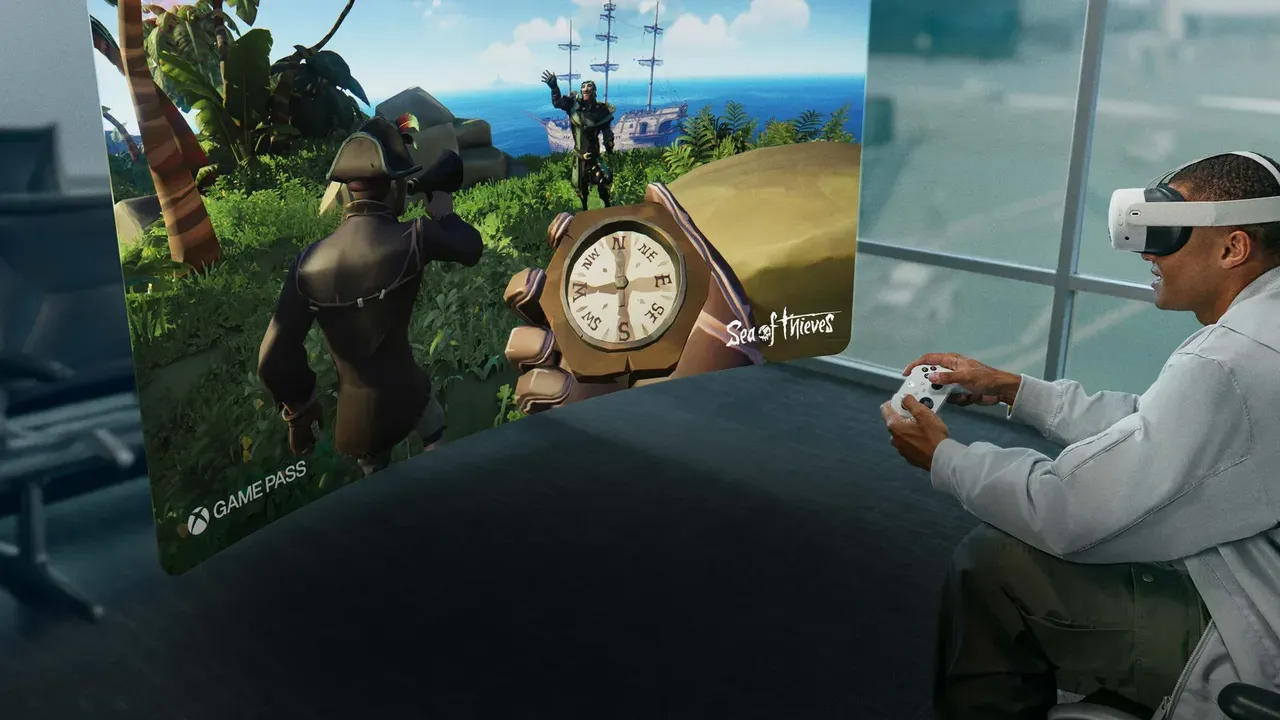
The Xbox app opens as a 2D panel attached to the Navigator. Meta says games stream at 1080p and 60fps. You can resize the panel and run it alongside other apps.
To move the screen:
- Using controllers or hand tracking, move the cursor to the outside edge of the window until a white line appears.
- Select the white line to grab the window.
- Drag it to a new spot on the Navigator, or anywhere in your space.
You can play with passthrough on, or in an Xbox-themed virtual environment.
7. Reduce lag
- For lower input latency, Meta suggests plugging your Xbox controller into the headset with a USB-C cable.
- To improve network latency, play close to your Wi-Fi router.
- If the controller is paired but the app doesn't respond to it, go to Settings > Devices > Gamepad and turn off Use the gaze cursor.
8. Stream from your own Xbox console
The Xbox app can also play games from your own Xbox console with remote play:
- Select your profile picture in the top right of the Xbox app.
- Select My consoles to see the consoles you can play remotely.
- Select CONNECT.
You can also select Cloud Gaming in the top left of the app, then select Remote play. Remote play needs a supported Xbox console with remote features turned on.
Want to stream PC games instead? See our guide to playing PC VR games on Meta Quest.
Questions et réponses
Do I need Game Pass Ultimate to play Xbox games on Quest?
No. Xbox Support says Game Pass Essential, Premium or Ultimate can be used for cloud gaming. Supported free-to-play games only need a free Microsoft account.
How many hours of cloud gaming do I get?
Beginning in November 2026, Xbox says Ultimate includes 15 hours a month, Premium 10 hours and Essential 5 hours. The starter edition included with Meta Horizon+ has 10 hours a month. You can buy extra playtime in the Xbox Store.
Can I play without a gamepad?
On Quest 3 and 3S, yes. Gamepad mode in Meta Horizon OS 2.7 and later lets the Touch controllers act like an Xbox gamepad, though Meta recommends a physical gamepad for longer sessions.
What resolution do games stream at?
Meta says games stream to the headset at 1080p and 60fps, shown on a 2D panel you can resize and move.
Where is Xbox Cloud Gaming on Quest not available?
Meta says it is available everywhere Meta Quest is supported except Iceland and Taiwan.