
PICO CLI Now Sets Up 10 AI Coding Assistants for XR Apps as Its Unity MCP Package Hits v0.1.1
PICO's open plugin marketplace now installs its XR development skills and MCP servers into ten AI coding assistants, and its Unity MCP Extensions package reached version 0.1.1 on October 25.
Por vrBlogs
· Lectura de 2 min · Fuente: PICO Developer (GitHub)
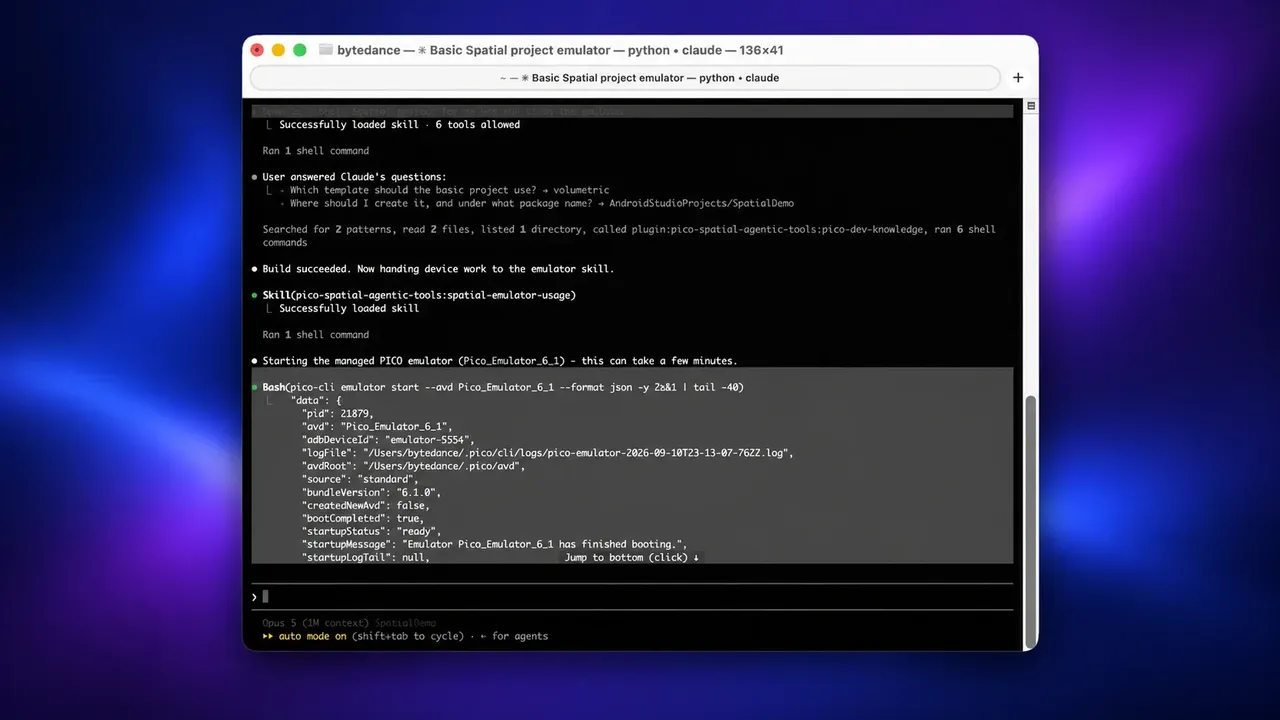
PICO keeps building tools that let AI coding assistants write apps for its headsets. Its PICO-Intelligent-Plugins repository on GitHub now sets up ten assistants, and a separate Unity package that exposes PICO XR features as MCP tools reached version 0.1.1 on October 25. On October 28, Road to VR reported on a mixed reality Super Mario 64 demo running on a Pico headset. Developer Lucas Martinic built it with Claude Opus 5.5 and PICO CLI.
How the setup works
- Install: developers run npm install -g @picoxr/pico-cli, then pico-cli setup, which shows a plan of what it will configure. Node.js 20 or newer is required.
- Ten assistants: Claude Code, Cursor, Codex, GitHub Copilot, Trae CLI, OpenCode V2, CodeBuddy Code, Qoder CLI, Antigravity CLI and Grok CLI. When PICO announced CLI 0.5.0 in September, it listed five. The full list of ten arrived with version 0.6.0 on September 29.
- Region switch: version 0.6.1, published to npm on October 20, added a --region option (cn, row or us) that decides where downloads and services are routed.
- Two targets: developers choose either the spatial plugin, which covers Kotlin apps for PICO OS 6 and the Spatial SDK, or the Unity plugin. Either one also installs a general plugin with a documentation-lookup skill that runs in a separate subagent. If the skill doesn't have the knowledge it needs, the README says, it reports the limitation rather than guessing.
- License and telemetry: the plugin marketplace is Apache-2.0. The CLI's npm page says anonymous usage telemetry is enabled by default, and pico-cli telemetry disable turns it off.
What the Unity package adds
The package, com.bytedance.pico.mcp-extensions, gives an agent working inside the Unity editor ten tools. Eight of them are building blocks for passthrough, controllers, controller haptics, locomotion, spatial mesh, plane detection, hand tracking and grabbing objects. The other two handle Unity Package Manager operations and report the state of every block. PICO describes the package as idempotent and non-destructive. Running a block twice changes nothing, XR Origins that the agent didn't create are left alone, and every scene edit goes through Unity's undo system.
It requires Unity 6000.0 or newer, PICO's Unity Integration SDK 6.1.0, XR Interaction Toolkit 3.4.0 and Unity AI Assistant, which the manifest pins to the 2.9.0-pre.2 preview. Plane detection and controller haptics work only on PICO's native runtime, because PICO ships no OpenXR plane-detection feature. Unlike the Apache-licensed marketplace, the Unity package's README says "All rights reserved."
What it means for developers
The tooling is still early: the CLI is on version 0.6.1 and the Unity package on 0.1.1. Martinic's Mario demo has no release date. Developers who want to try PICO's approach can read the skills and setup guide in the public repository before pointing an agent at their project.
¿Te ha gustado este artículo?
Indica que te gusta para avisar a los editores o guárdalo para leerlo más tarde.
Comentarios
Inicia sesión para participar en la conversación.
Iniciar sesiónAún no hay comentarios. Inicia la conversación.
·